Buyers should label every paper rope basket quantity as a planning signal, a request for supplier confirmation, or a firm purchase-order commitment. Use one SKU-level forecast register with version dates, horizons, assumptions, response fields, and a defined conversion gate. Do not let emails, rolling files, or material discussions silently become orders; only the buyer-authorized document and agreed commercial terms should release a firm quantity.
1. What decision should a paper rope basket forecast support?
A forecast should help the buyer and supplier discuss expected demand, assortment direction, timing pressure, and information still needed before an order can be released. It is not a substitute for a complete product identity, approved commercial basis, or authorized purchase order. The parties should state what each forecast version is intended to support and what it does not authorize.
Start with the buyer's decision. Is the file meant to request feasibility feedback, prepare a quotation, compare possible order windows, reserve an internal budget, or signal a likely replenishment? A buyer reviewing the paper rope basket range may shortlist several constructions before knowing the final mix. That early volume can guide questions, but it should not be presented as a confirmed order.
Use explicit status words instead of colors alone. A row marked planning estimate, supplier response requested, buyer review, or firm PO is understandable after the spreadsheet leaves its original team. If a supplier needs a different status to take a specific action, record that action and its commercial conditions rather than relying on the word forecast.
2. Which quantity states should buyers keep separate?
A practical control has at least three states. A planning quantity is the buyer's current view of possible demand. A supplier-confirmation quantity asks the supplier to respond on feasibility, timing, quotation validity, or another named question. A firm quantity appears on the buyer-authorized purchase order or other explicitly agreed release document. The exact legal effect depends on the parties' documents and applicable agreement; this guide does not assign legal force to a label.
Keep optional scenarios separate from the base forecast. If the buyer is comparing 500, 1,000, and 2,000 selling units, do not add the three cases into one apparent demand number. Name the scenario, probability owner, decision date, and commercial question. Likewise, separate a replenishment estimate from a launch quantity and a promotional upside case.
Never copy an old order quantity forward without checking SKU status, product revision, pack count, color mix, destination, and requested timing. A familiar number can still refer to a different selling unit. The forecast register should preserve where the quantity came from and who can change it.
3. What belongs in a forecast-to-order control table?
Use one row per SKU, color, selling unit, destination, and required period that needs a separate decision. The table below is a working template, not evidence of an actual forecast, capacity reservation, or order.
| Control field | Planning entry | Supplier response | Firm-order gate |
|---|---|---|---|
| Product identity | Buyer SKU, supplier code, revision, set quantity | Confirm mapping or flag a mismatch | Same approved identity appears on the PO |
| Quantity state | Base forecast, scenario, or response request | State what was reviewed and under which assumptions | Authorized firm quantity is explicit |
| Time period | Week, month, launch window, or requested handover | Confirm the timing basis used in the response | PO states the agreed date basis |
| Assortment | SKU, color, size, and selling-unit mix | Identify mix constraints or open questions | Exact line quantities reconcile to the total |
| Commercial basis | Currency, quantity tier, packing basis, named delivery term if applicable | Return validity, exclusions, and alternatives | Current agreed terms are attached or referenced |
| Product readiness | Specification, sample, artwork, label, and packaging status | Identify missing approvals | Required release gates are closed or scoped |
| Revision control | Forecast version, owner, issued date, superseded version | Acknowledge the version reviewed | PO references the current governing records |
| Action boundary | Discussion only, quote request, or named preparation request | Confirm action and any condition before starting it | Only authorized release work begins |
Do not merge supplier comments into the buyer's original quantity field. Preserve the issued value, then place confirmed, alternative, and unable-to-confirm responses in separate columns. This keeps the negotiation history visible and prevents a returned spreadsheet from looking like the buyer approved the supplier's proposal.
4. How should buyers define SKUs, sets, and assortment quantities?
Forecast accuracy begins with the commercial selling unit. A basket set can be forecast as sets, individual pieces, inner packs, or cartons; those quantities are not interchangeable. State the unit beside every number and map each buyer code to the current supplier code and product revision. If a set contains several components, identify whether the forecast applies to complete sets or replacement components.
Color and size mixes need their own rows or a controlled ratio table. A total of 1,000 sets does not tell the supplier whether the mix is one color, four equal colors, or a buyer-defined assortment. Do not use a percentage without defining the denominator and rounding rule. When the ratio is still open, mark it open rather than filling an assumed split.
The factory quote comparison guide is useful when the forecast is being used to request price tiers. Normalize the product, quantity basis, packing, currency, delivery basis, one-time charges, and exclusions before comparing replies. A lower unit price against a different mix or pack-out is not a like-for-like forecast response.
5. What should the supplier acknowledge before planning discussions advance?
Ask the supplier to acknowledge the forecast version, product identities reviewed, quantity states, time basis, assumptions, exclusions, and open inputs. The response should distinguish information reviewed from actions accepted. For example, a supplier may confirm that a scenario was evaluated without confirming a price, date, material purchase, or production allocation.
Require clear response choices: confirmed for the stated planning question, alternative proposed, more information required, or not reviewed. A blank cell is not confirmation. If a response depends on sample approval, artwork, packing, material availability, a minimum quantity, or another condition, keep that dependency beside the affected row. Do not convert a conditional reply into a firm commitment.
Set a response-validity date because a forecast can change. When the buyer revises quantity, mix, timing, or product identity, identify which supplier responses need rechecking. The goal is not to demand that every discussion remain valid indefinitely; it is to prevent an old response from being attached to a different scenario.
6. How should versions, horizons, and freeze dates work?
Give every forecast a unique version, issue date, owner, covered periods, and replacement rule. A rolling file should show which periods changed, which remained unchanged, and which were removed. Avoid filenames such as latest forecast. Use a stable register so both teams can identify the exact version under discussion.
Separate the visibility horizon from the firm-order horizon. The buyer may share a longer planning view while releasing only a nearer period. Label those zones and define when each is reviewed. If the parties use a freeze date, write what freezes: product identity, quantity, assortment, artwork, requested handover, or some combination. A date without a named scope creates false certainty.
Record forecast variance as information, not blame. When a new version changes, show the previous planning quantity, new planning quantity, reason category, and downstream decision. The change may trigger a fresh quote, feasibility review, packaging recalculation, or no action. Do not rewrite the old file to hide the variance.
7. How should material or capacity discussions avoid implied commitments?
Forecast conversations may raise questions about material preparation, labor planning, production windows, or packing resources. Those questions should be documented without claiming that JINZHAO CRAFT or any supplier has reserved capacity, purchased materials, fixed a price, or claimed fixed timing. Ask the supplier what action would be required, who authorizes it, what information it depends on, and which written terms apply.
If the buyer wants a supplier to take an action before the firm PO, create a separate, explicitly authorized record. Name the product scope, quantity basis, cost or liability treatment if any, cancellation or change process, validity, and approving parties. Do not hide such an action inside a forecast column or informal message. Buyers should obtain their own commercial or legal review where the commitment boundary matters.
The retained MOQ, capacity, and lead-time planning model can help teams identify variables that need supplier confirmation. It should not be used to invent a fixed MOQ, capacity figure, sample cycle, production time, or reservation for a specific project.
8. How can a four-piece basket set illustrate the identity problem?
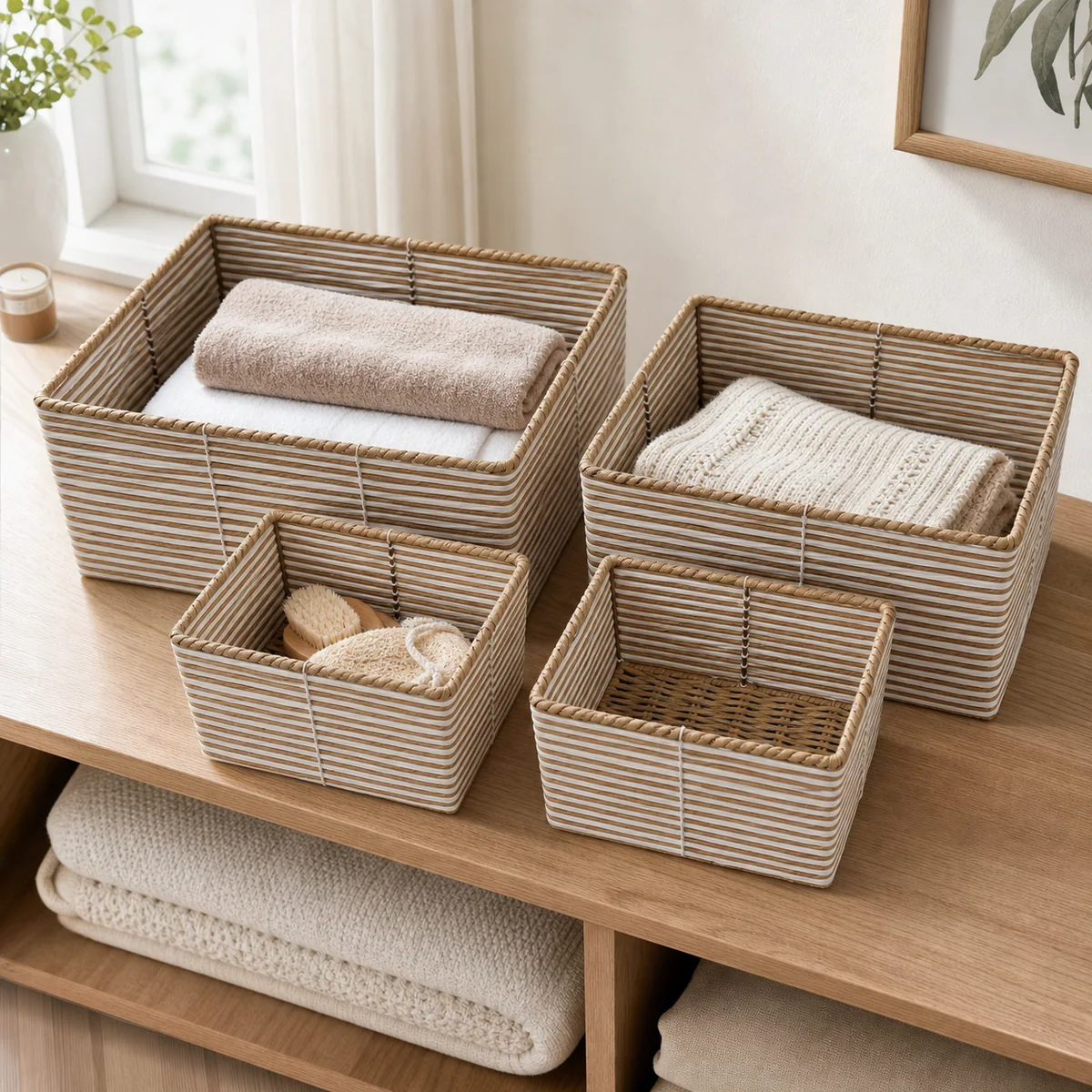
The current CMS identifies JZ10111 as a natural brown and white stripe paper rope rectangular four-piece nested basket set. Its verified scene image visibly shows two larger and two smaller rectangular baskets with horizontal natural-brown and white bands.
A forecast for this reference would need to state whether the quantity means four-piece selling units or individual baskets. It would also need the governing buyer and supplier codes, revision, color direction, assortment, pack basis, and requested period. Writing 1,000 baskets would leave the commercial unit unclear; writing 1,000 four-piece sets would still not confirm price, availability, MOQ, timing, or a purchase commitment.
The CMS record and image support only the product identity and visible four-piece relationship used in this example. They do not establish a real forecast, order, customer, material reservation, capacity, price, MOQ, sample timing, production timing, pack-out result, or commercial obligation.
9. What converts a forecast row into a firm purchase order?
Use a defined conversion gate. Before release, reconcile product code and revision, selling unit, exact quantity, assortment, price and currency, packing basis, artwork and label references, requested and agreed date basis, delivery terms, payment terms, approval status, and authorized document owner. Resolve or explicitly scope every mismatch between the forecast response and current order.
The purchase-order acknowledgment guide explains how the supplier's return should reconcile the released order before production. Keep the forecast as background evidence; do not let it override the PO. If the supplier acknowledgment proposes a different quantity, date, specification, or term, route that difference back to the buyer for an explicit decision.
After release, mark the forecast row converted, partially converted, replaced, or not ordered. Link the firm document ID and preserve remaining planning quantities as a new decision, not as an accidental balance order. This prevents teams from later treating the difference between forecast and PO as an unapproved shortfall.
10. Copy this forecast-handoff checklist
- State the decision purpose and the actions the forecast does not authorize.
- Use one row per product, revision, selling unit, color or size mix, destination, and period.
- Label each quantity as planning, supplier response requested, or firm PO.
- Separate base demand, optional scenarios, launches, promotions, and replenishment.
- Write the unit of measure and reconcile set, piece, inner-pack, and carton quantities.
- Give every version an owner, issue date, covered horizon, and supersession rule.
- Preserve the buyer's issued value and the supplier's reply in separate fields.
- Record assumptions, exclusions, dependencies, alternatives, and response validity.
- Authorize any pre-PO material or capacity action in a separate written record.
- Reconcile the current specification, approvals, quantities, mix, packing, and commercial terms before PO release.
- Link the released PO and acknowledgment back to the forecast row.
- Send the controlled product and quantity brief through the RFQ form when requesting a specification-based supplier response.
11. Frequently asked questions
Is a rolling forecast the same as a purchase order for paper rope baskets?
Not automatically. Label the forecast's purpose, status, and permitted actions, then use the buyer-authorized purchase order or other explicitly agreed release document for firm quantities. The parties' agreements determine legal effect, so do not rely on the filename or the word forecast alone.
Should buyers include optional upside quantities in the base forecast?
No. Keep the base forecast and optional scenarios in separate fields with their own owner, decision date, and assumptions. Combining them can make an exploratory case look like expected demand and can distort quotation, mix, or timing discussions.
What should a supplier confirm when replying to a forecast?
The supplier should identify the exact version, product codes, quantity states, time basis, and assumptions reviewed, then mark each response as confirmed for the named planning question, alternative proposed, more information required, or not reviewed. Conditional replies should keep their dependencies visible.
Can a forecast authorize material purchasing before the firm PO?
Only through a separate, explicit authorization that defines scope, conditions, cost or liability treatment where applicable, change or cancellation handling, validity, and approvers. Do not assume that sharing a forecast authorizes material purchase, capacity reservation, price fixation, or production.
How should buyers handle the difference between forecast and ordered quantity?
Mark the forecast row as converted, partially converted, replaced, or not ordered, link the firm document, and carry any remaining planning quantity into a new decision. Do not treat an unordered forecast balance as a supplier shortfall or an automatic future order.